Pages

Saturday, 6 October 2018

How to drive clicks through effective meta descriptions

When it comes to optimizing website content, there’s typically a lot of talk about the importance of choosing the right keywords and drafting compelling headlines – but the impact of meta descriptions on a website’s on-page SEO too often goes overlooked.
While you may think you have ticked all the boxes to boost visibility of your ecommerce site, the absence of an accurate meta description might just be costing you traffic and sales.
So, what are meta descriptions? They are short, unique snippets that describe a webpage. Think of what you would write if you had to advertise the webpage – that is exactly what meta descriptions need to include.
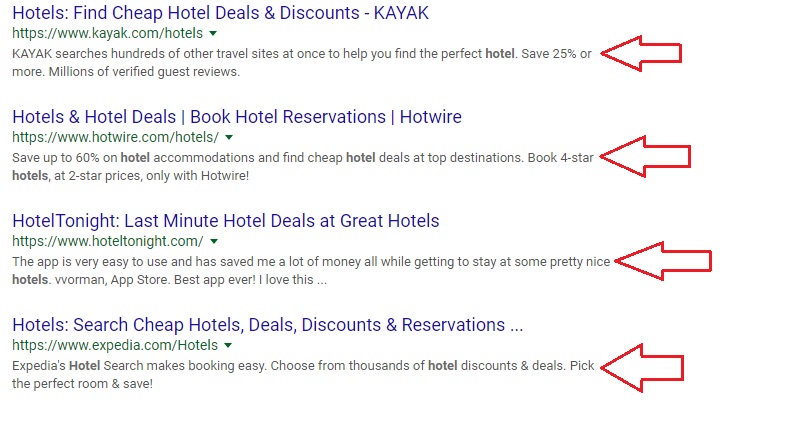
Many people tend to leave meta descriptions blank without realizing the effect it has on search results. A powerful meta description leads to a rise in click-through-rates which boosts the SEO ranking of your page. Simply put, they form the first impression of your website, so you rather make it a good one.
Here are 6 ways you can optimize meta descriptions to ensure clicks.

Answer questions

Whether it’s seeking the nearest plumbing services or discovering the best hotels in Maldives – everyone on Google has come looking for answers to a problem.
Put yourself in a customer’s shoes and think about what they could possibly ask to which your business can pose a solution. Your meta description needs to answer their question and impart value to entice them to click on your website. Click Here to Read more

Google Search Console is currently down!

Can't access your Google Search Console properties? Do not worry, you are not alone.

Google Search Console, which is normally accessible at https://search.google.com/search-console is currently not loading. The page returns a 503 server error.
This is currently a widespread error. We have informed Google about the issue.
There is currently no estimated time for a fix. Google Search Console went offline at about 3:50pm EDT.
The old interface is still available at google.com/webmasters/tools/home.
At 4:15pm EDT, about 25 minutes after the service went down, it now seems to be back up and running. Click Here to Read more

Google on Dealing with Low Traffic Pages!

On a Webmaster Hangout John Mueller offered advice on whether it was helpful to prune low traffic content. This topic is related to what the SEO industry calls Keyword Cannibalization and also Content Cannibalization. Google’s John Mueller offered insights into internal discussions at Google about content pruning. He then offered two solutions.

Is Pruning Content a Good SEO Strategy?

The question asked was whether it was worth it in terms of SEO to prune content that was not performing. By “performing,” the questioner clarified that he meant content that was not receiving traffic. He also clarified that it was research content that was not adding value to site visitors.
The person asking the question did not mention the concept of content cannibalization. But the outlines of what he was asking conforms to the theory. More on that below.
John Mueller suggested that pruning content was just one approach. There are other strategies to use as well. Click here to Read more

Sunday, 19 March 2017

Google commands for SEO

Google commands to know for SEO

Google is the most used search engine. As marketing manager you need to know that Google offers additional information that is sometimes ignored and available through special commands.
By typing advanced commands in the search engine, you can filter the results and get more precise answers on a keyword, or simply check your website indexation. These commands are important in helping you improve your ranking.
Nowadays, everyone is capable to make a search based on « keywords » in Google. Although these classic searches may enable you to find interesting results, it is also necessary to know special commands to be able to question the search engine better and that these could help you to improve your SEO

1 – The « site: » command


The Google « site: » command shows the list of pages known of the domain indicated . It will allow the indexation of a website or a part of website to be studied. It gives an approximation of the number of pages known in the search engine.
For example, the request (site:myposeo.com) lists indexed pages of the myposeo.com website. This command can be useful during the website creation to track indexation.
 
Note: the first result that appear in the search engine relates to the Google Search Console. Having a Google Search Console account allows you to analyse ranking in Google and get some information to improve SEO. A little advertising for Google tools!

2 – The « allintitle: » command


The « allintitle » command allows to get all the pages containing the keyword in the title tag. The research is only done on the pages titles. In the example below, the command sends back all the web pages with the world « myposeo » in the title tag, i.e. 1060 pages.


3 – The « allinurl: » command

This command lets you restrict the search to the URL of HTML pages. allinurl:myposeo sends back all pages having the keyword « myposeo » in the URL.


4 – Insert quotation larks « « 

Quotation marks allow to make a search on the exact terms making up the request. Only pages carrying the expression (in the order) will come up between quotation marks.
This command can also detect duplicate content. By inserting a complet sentence in quotation marks, the websites that have already used the same sentence will be displayed. This command also allows you to find websites related to your domain and, therefore, often competitors.

5 – Insert the minus sign –

This command remove a term or a domain of the search. For example, the request : « voyage train -avion -voiture » displays the results with the words « voyage » and « train » but excludes all the pages mentioning about « avion » and « voiture ».


Note : – is preceded by a space otherwise the words are connected.
Google search engine is flexible because it provides many other commands that will allow you to refine searches and get a large amount of information about a website or its competitors. With the results obtained, webmasters can find good sources for netlinking to improve their websites’ ranking, for example.
So, now you need to analyse the search engine in every corner your website!

Saturday, 15 October 2016

How much Campaigns AdWords to Allow Per Account ?

Google Announcement earlier, you can now have up to 10,000 campaigns (this will include active and paused campaigns) per advertiser account. The number of keywords hasn’t changed, however.

 How much Campaigns AdWords to Allow Per Account ?


Here are the up-to-date AdWords account limits:

10,000 campaigns (active and paused)
20,000 ad groups per campaign
5,000 keywords per ad group
300 display ads per ad group (including image ads)
4 million active or paused ads per account
3 million keywords per account
10,000 location targets (targeted and excluded) per campaign, including up to 500 proximity targets per campaign
100,000 active ad extensions per account
1.3 million references to ad extensions per account

Saturday, 8 October 2016

Here is Best 5 Free Backlink Checker Tools For SEO 2016

 Best Free Backlink Checker Tools For SEO

Here is Top Backlink Checker Tools in SEO 2016, Some of These tools is provide you the result in detail, and some tools is How many backlinks are coming in your blogs, So According to your requirement , ou can use any tool in it for your website or blogs.